
 Photoshop
 ZBrush
 Houdini
 Unreal Engine
 Substance Painter
 Blender
 Nuke
Nuke Arnold
 KeyShot
 V-Ray
V-Ray Mari
Mari Marvelous Designer
 Marmoset Toolbag
 Substance Designer
 3ds Max
 3DCoat
 Redshift
 After Effects
 Faceform Wrap
 Lightroom
 OctaneRender
 SpeedTree
 Daz 3D
 Agisoft Metashape
 Fusion
 Modo
Modo RealityCapture
 Gaea
Gaea Cinema 4D
 Gravity Sketch
 Premiere
 Procreate
 Substance 3D Modeler
 Katana
 Mudbox
 Krita
Krita World Creator
 Yeti
Yeti Ziva VFX
 SketchBook
 Quixel DDO
 Mixamo
 Natron
 Quixel Bridge
 Quixel Megascans
 Adobe Medium
 Quixel Mixer
 SynthEyes
 Clip Studio Paint
 SketchUp
 Unity
Unity Gaffer
 Massive
 Materialize
 Ornatrix
 PreForm
 Corel Painter
 Moi 3D
 QuickTime
 Storyboard Pro
 TreeIt
 animBot
 ReCap
ReCap Meshmixer
 DaVinci Resolve
 World Machine
 xNormal
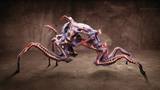


Over approximately four hours, Francesco creates a documentary-style dinosaur animation shot, taking it from initial reference selection through final animation. The process begins with analyzing references and identifying the key elements needed to build an engaging performance while still satisfying a client’s brief. He then shows how to develop the shot through blocking, followed by a simulated client and supervisor review, using their feedback to identify priorities, address notes, and move the animation into the primary and final stages.
A major component of the workshop is developing an efficient and consistent animation workflow. He explores AnimBot and the tools he personally finds most useful for speeding up the animation process, maintaining consistency, and improving quality without spending unnecessary time on details that may have little impact on the final shot.
Along the way, the workshop provides practical production tips, including common mistakes, oversights, and inefficient approaches that animators may encounter early in their careers—or may simply not have had the opportunity to recognize yet.
AnimBot is used as a supporting tool throughout the workshop; the character rigs used were created by Truong CG Artist, and the ImagePlaneLoader used was created by Andy J. Latham.
The workshop's primary goal is not to teach a specific tool or rig, but to provide practical knowledge and insight into the professional animation workflow and the decision-making required to deliver a high-quality, production-ready shot. Note that this workshop, being focused on creature animation, intentionally does not include the fluid simulation or effects of the alligator interacting with the water as that would be handled later by the effects department.
7 Lessons
Francesco Barbera introduces his workshop by discussing the professional animation production environment, how studios operate, what to expect, and what studios expect from an animator. After reviewing a typical client brief and its requirements, he shows how to analyze collected references and identify the key information needed to plan and structure the shot's first pass.
Duration: 30m 29s

This second lesson covers the most important AnimBot tools and features used throughout the animation process. Francesco then moves into the practical setup of the shot, demonstrating how to integrate the selected references directly into the scene to create an efficient reference layout and prepare the animation for the blocking stage.
Duration: 39m 36s

This lesson focuses on creating the initial animation blocking using the selected references as a guide. He shows how to establish the key poses, timing, spacing, and overall performance of the shot, focusing on essential storytelling elements and building a clear, production-ready foundation before sending it to the client and moving into the primary animation stage.
Duration: 31m 22s

Part 2 continues with how to establish the key poses, timing, spacing, and overall performance of the shot, focusing on essential storytelling elements and building a clear, production-ready foundation before sending it to the client and moving into the primary animation stage.
Duration: 36m 51s

This lesson simulates a production debrief with the client and supervisor, discussing how to review their feedback on the blocking stage. Francesco explains how to identify, prioritize, and address their notes before moving into primary animation, refining the existing performance and incorporating the required changes into the next stage of the shot while maintaining the original creative intent.
Duration: 28m 24s

Part 2 continues with how to identify, prioritize, and address client notes before moving into primary animation, refining the existing performance and incorporating the required changes into the next stage of the shot while maintaining the original creative intent.
Duration: 29m 4s

This final lesson focuses on the AnimBot tools used throughout the shot and how they can support an efficient final animation workflow. Francesco shows how to refine the primary animation, add the remaining secondary details and polish, and complete the shot before preparing it for the final review, concluding the animation process with a polished, production-ready result.
Duration: 52m 8s

Primary tools
For this workshop you’ll need:

* Note that these programs and materials will not be supplied with the course.
Skills Covered
Who’s this Workshop for?
This workshop is designed for junior- to mid-level animators with a solid foundation in animation who want to better understand how to approach animation work in a professional studio environment.
The focus goes beyond the fundamentals of animation, exploring how to work efficiently on a production, what to pay attention to, how to prioritize tasks, and how to make the most of your time when working under real production deadlines.
A key part of the workshop covers how to use AnimBot, with a strong focus on tools and workflows that can speed up the animation process, improve workflow, and make day-to-day production more efficient.
Learning Outcomes
By completing this workshop, artists will better understand how to approach a documentary-style animation shot for a professional studio setting.
Key skills include:
- How to analyze and use animation references effectively, identify key information, and apply it purposefully within a shot.
- Improve animation workflow efficiency with AnimBot, using practical tools and techniques to streamline the animation process.
- Optimize time and effort during production by prioritizing key animation choices and avoiding unnecessary work on minor details.
- Create production-ready animation blocking, establishing clear poses, timing, spacing, and storytelling choices that effectively communicate the intended performance.
- Analyze and respond to client feedback, identify priorities, and translate notes into clear, actionable animation changes.
- Develop the primary animation pass, refining key performance elements overlooked during blocking to bring the shot close to final quality.
- Complete the final animation pass, adding secondary details, refinements, and polish that enhance the performance and bring the shot to completion.


